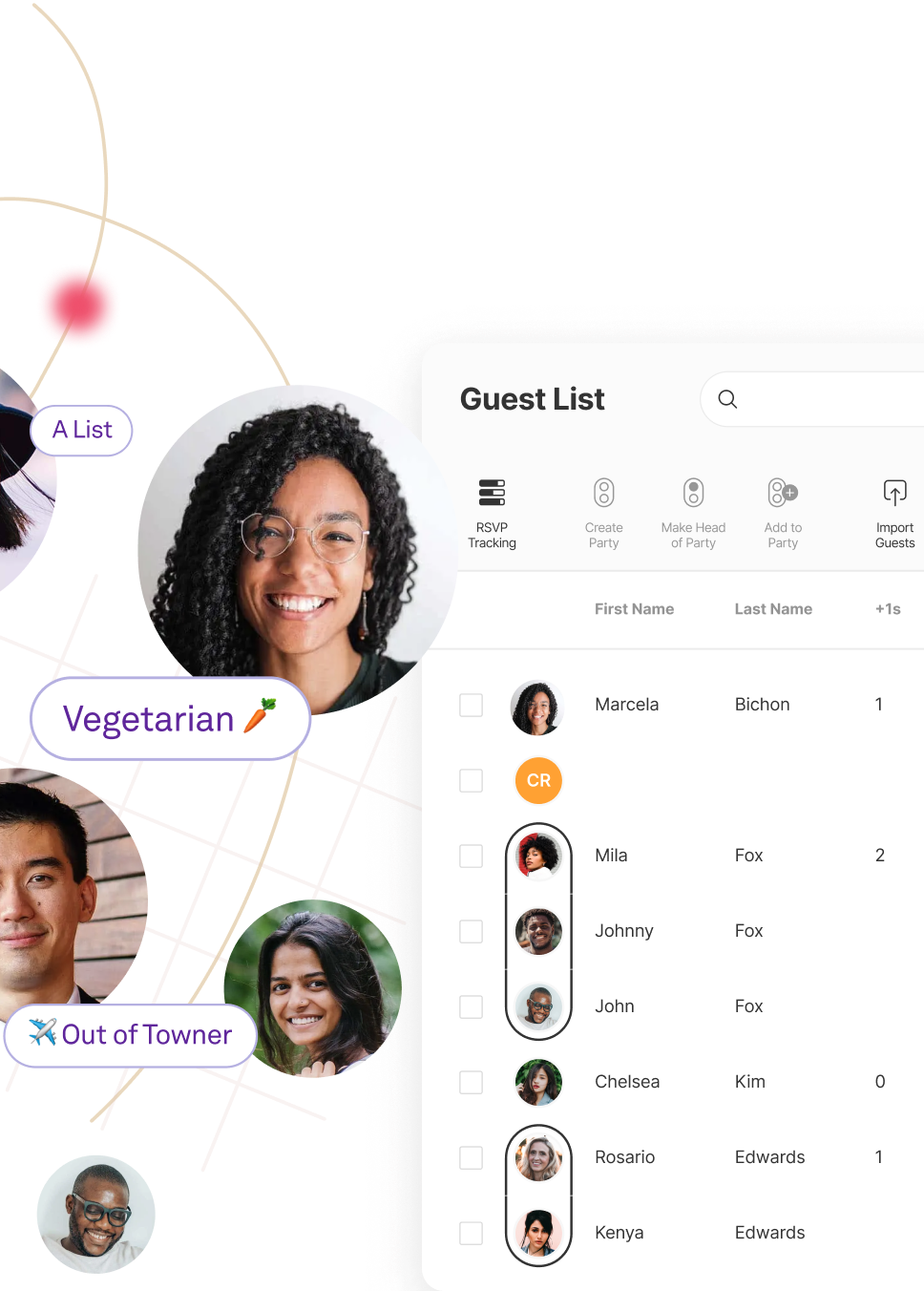
The connected wedding guest list.

Organize all the details of your wedding day. Collect addresses, add or import guest lists, send messages, and track RSVPs, all from your guest list.


Group
your guests.

Organize all
the details.

Send cards
and messages.

Collect RSVPs
for all your events.

The connected wedding guest list.

Organize all the details of your wedding day. Collect addresses, add or import guest lists, send messages, and track RSVPs, all from your guest list.


Group
your guests.

Organize all
the details.
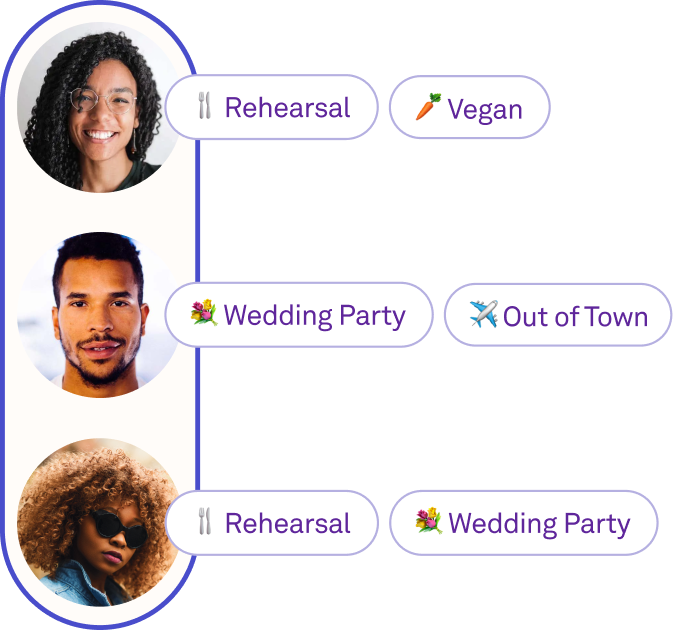
Send cards
and messages.
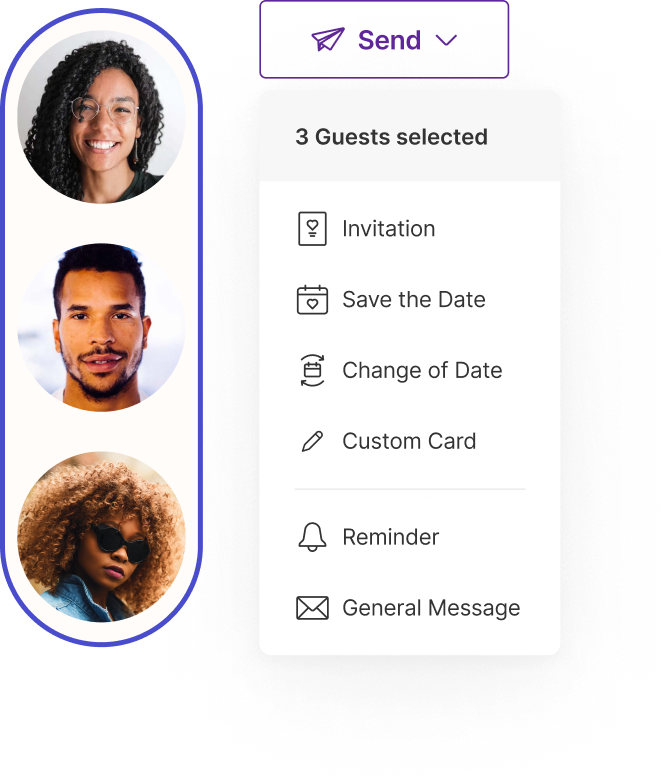
Collect RSVPs
for all your events.

Everything guest at a glance.

Organize your guests.

Organize your guests.

Assign plus ones, group families and dates together, and organize guests with tags.

Communicate with your guests.

Communicate with your guests.

Send Save the Dates, invites, custom eCards and more, right from your guest list.

Track your guests’ responses.

Track your guests’ responses.

See guests’ RSVPs, who has opened your invite, and who’s purchased a gift from your registry, all in one place.

Less time guest listing, more time bucket listing.

Less time guest listing, more time bucket listing.

Multiple Editors

Work on your guest list together without sharing passwords.

Invite your partner, mom, or wedding planner to collaborate on your guest list without having to share accounts or passwords.

Spreadsheet Import and Export

Already started your list? All good.

Import your spreadsheet to create your smarter guest list, then export it to share with vendors.

A guest list
worthy of your celebration.

Smart Guest Tags

Organizing is your super power.

Whether for your wedding party, family members, or table arrangement, use tags to simplify your wedding planning.

Easily manage private schedules, invites, and RSVPs for your guests.

Apply tags to invitations, RSVP questions, and events to manage who sees what.

Prioritize guests from A to B-List, even C.

Track groups of guests and send out invitations in batches.

Filter and sort to your heart’s desire.

Smart guest tags make it simple to filter responses for group.

Tag guests
any way you want.

Couples have used tags in many unique ways to help them plan. Get inspiration from some of our favorites.

Tag guests
any way you want.

Couples have used tags in many unique ways to help them plan. Get inspiration from some of our favorites.

Dog OwnersDog Owners
Abc ListsAbc Lists
Out of TownersOut of Towners
Table NumbersTable Numbers
SinglesSingles
Dog OwnersDog Owners
Abc ListsAbc Lists
Designated DriversDesignated Drivers
KidsKids
College FriendsCollege Friends
BestiesBesties
Gift trackingGift tracking
Designated DriversDesignated Drivers
KidsKids
VegansVegans
MaybesMaybes
Significant OthersSignificant Others
Mom’s FriendsMom’s Friends
AllergiesAllergies
VegansVegans
MaybesMaybes
College FriendsCollege Friends
BestiesBesties
Gift trackingGift tracking
KidsKids
VegansVegans
Gift trackingGift tracking
College FriendsCollege Friends
BestiesBesties
Designated DriversDesignated Drivers
MaybesMaybes
Dog OwnersDog Owners
Abc ListsAbc Lists
AllergiesAllergies
VegansVegans
Mom’s FriendsMom’s Friends
Dog OwnersDog Owners
Abc ListsAbc Lists
Out of TownersOut of Towners
BestiesBesties
Designated DriversDesignated Drivers
Out of TownersOut of Towners
Table NumbersTable Numbers
AllergiesAllergies
VegansVegans
Designated DriversDesignated Drivers
KidsKids
SinglesSingles
Abc ListsAbc Lists
Dog OwnersDog Owners
Gift trackingGift tracking
Out of TownersOut of Towners
Table NumbersTable Numbers
BestiesBesties
VegansVegans
KidsKids
MaybesMaybes
College FriendsCollege Friends
Gift trackingGift tracking
Designated DriversDesignated Drivers
MaybesMaybes
Abc ListsAbc Lists
Dog OwnersDog Owners

Group your guests,
we’ll take care
of the rest.

Assign plus ones, allow guests to RSVP for their households, and more, with the guest list that keeps all your plans streamlined.

Manage Plus Ones

Add or limit plus ones so guests can only RSVP for their assigned headcount.

Make RSVP Groups

Allow guests to easily respond on behalf of their household or party.

Send and track it all.

From Save the Dates to RSVP reminders, talk to your guests from one place.

Send and track it all.

From Save the Dates to RSVP reminders, talk to your guests from one place.

All the Cards

Signed, sealed, delivered.

Wedding Invitations

Create and send beautiful invites, then watch the responses roll right into your guest list.

Save the Dates

With Save the Dates that match your site, guests can quickly add your date to their digital calendars.

Custom eCards

Customize eCard designs to use for any and all your wedding events, or even as thank you notes.

Announcements & Reminders

Easily message anyone or everyone.

Whether an RSVP reminder or a last-minute announcement, send updates right to your guests’ inboxes.

Email and Invite Tracking

See who’s seen what.

Gone are the days of ghosting. Know who has opened, read, and replied to your messages.

Response Tracking

Stop guestimating.

Collect details for multiple events, see guests' responses as they come in, and view up-to-date head counts at a glance.

Your Wedding Website

The wedding website that does more.

Share everything your guests need to know for your big day, from your event schedule and FAQs, to your gift registry.

Your Wedding Website

The wedding website that does more.

Site To See Text

Still have questions?

The more the merrier. Big or small, Joy is built to scale.

Yes! Adding multiple admins to your account is simple. You can make any guest an admin of your event.

Yes, you can assign any number of plus ones per guest, whether that’s 0 or 20.

Short answer: No. We know people might find significant others or change who they’re bringing to the party. For those cases, you can simply assign them a slot to bring someone.

You don’t need to know a guest’s email address for them to be able to RSVP. However, if you are sending ecards to your guests via Joy before they RSVP you will need guests’ email addresses to send them.

No. Creating an account is totally optional and the prompt comes after guests complete their RSVP.

You can generally expect about 85% of local guests and 55% of out-of-town guests to attend your wedding when predicting your guest count.

It depends on a few factors. Explore Getting Started With Your Wedding Guest List for more information on how to navigate wedding planning and your guest list preferences.

Joy wedding websites, planning tools, and registry are free. Online Save the Dates and invitations have hundreds of free designs, as well as premium paid designs.

Absolutely! Our amazing support team works hard around the clock, every day of the week, including weekends, to make sure that your questions are answered. You can send us an email at support@withjoy.com.

What Is a Wedding Guest List Manager?

A wedding guest list manager is an online tool that replaces the spreadsheets, sticky notes, and group texts that couples traditionally use to track who is coming to their wedding. It centralizes guest names, contact details, RSVPs, meal choices, mailing addresses, and event assignments into a single, organized system that both partners (and anyone they invite to help) can access and update in real time.

Unlike a static spreadsheet, a wedding guest list manager is built specifically for how weddings actually work. Guests arrive in groups — couples, families, parties. Some events are invite-only. Plus-ones need to be tracked without creating confusion. RSVPs change. Addresses are missing. A purpose-built tool handles all of this without the workarounds and formula gymnastics that spreadsheets demand.

Joy's Guest List Manager is free and connects directly to your wedding website, invitations, RSVPs, and registry — so every piece of your wedding planning stays in sync without manual data entry between tools.

Why You Need a Wedding Guest List Manager

The guest list is one of the first things couples build and one of the last things they finalize. It shapes your budget, your venue choice, your seating chart, and your catering order. Managing it well saves money and stress. Managing it poorly creates cascading problems that surface at the worst possible moments.

Here is what a dedicated wedding guest list manager solves that spreadsheets cannot:

Real-time collaboration. Both partners, parents, and your wedding planner can add and edit guests simultaneously without version conflicts or emailing files back and forth.

Automatic RSVP tracking. When guests respond through your wedding website, their status updates instantly on your list. No manual entry, no missed responses.

Household and party grouping. Families, couples, and friend groups are linked together so one person can RSVP for the whole party, and everyone is properly addressed on invitations.

Event-specific permissions. Not every guest is invited to every event. Tags let you control who sees and can RSVP for the rehearsal dinner, welcome party, or after-party — without managing separate lists.

Communication hub. Send save the dates, invitations, reminders, and announcements directly from your guest list. Track who has opened, read, and responded to every message.

One source of truth. Guest details, RSVPs, dietary restrictions, gift tracking, and address collection all live in one place, accessible from any device.

Everything You Can Manage in Joy's Guest List

Joy's Guest List Manager is designed around the real workflows of wedding planning — not a list of features, but the things you actually need to do, in roughly the order you will do them.

Build Your Guest List

Most couples start with a rough list of names scattered across text messages, notes apps, and conversations with family. The first step is getting everyone into one place.

Add guests individually. Type names directly into the guest list from your dashboard. You can add details like email, phone, and mailing address right away, or come back to fill them in later.

Import a spreadsheet. If you have already started a list in Excel, Google Sheets, or Numbers, export it as a CSV and upload it to Joy. The import tool maps your columns to Joy's fields — names, addresses, tags, party groupings — so you do not have to re-enter anything. See the import guide for formatting tips and the downloadable template.

Import existing contacts. Pull names from contact lists you have already built so you are not starting from scratch.

Use the Contact Collector. Instead of chasing guests for their details one by one, share a single link and let them fill out a simple form with their mailing address, phone number, and email. Their responses save directly to your Joy guest list — no spreadsheet intermediary, no manual data entry. You can send the Contact Collector link via email or text through Joy, or copy it and share it however you like. Guests can even add details for their plus-ones in the same form, reducing duplicate entries on your list. See the Contact Collector guide for setup and sharing options.

Merge duplicates. It happens to everyone: you type “Michael” when adding guests, and then he RSVPs as “Mike.” Now you have two entries for the same person. Joy's merge tool lets you combine duplicate records into one without losing RSVP responses, email tracking history, or any other data. Learn how to merge duplicates.

Edit guest details. Click any guest to view and update their full profile — contact information, RSVP responses, email history, dietary needs, and notes. Customize which columns appear on your list view to keep the most relevant information front and center.

Organize Households

Weddings are not just about individuals — they are about families, couples, and groups. Joy lets you organize guests into parties so that everyone in a household is treated as a unit.

When guests are grouped into a party, the invitation addresses everyone by name (no more “and family” guesswork), and one person can RSVP on behalf of the entire group. This is especially useful for families with young children who will not be submitting their own response.

You can create parties when adding guests, when importing a spreadsheet (using the Party column), or at any point by selecting guests and clicking “Create Party.” See the full guide to parties and plus-ones.

Manage Plus-Ones

Plus-ones are one of the trickiest parts of any guest list. Some guests have a known partner. Others get a blank plus-one. Some do not get one at all. Joy gives you control over each scenario.

You can assign a named plus-one (the partner's name appears on the invitation) or a blank plus-one (the invitation says “and guest,” and the person fills in their guest's name when they RSVP). Either way, the plus-one is tracked on your list, counted in your headcount, and included in RSVP responses.

The plus-one column on your guest list makes it easy to see at a glance who has a plus-one, who does not, and who still needs a decision. Learn more about adding plus-ones.

Collect RSVPs

Most weddings involve more than one event, and not every guest is invited to all of them. Joy's RSVP system handles multi-event weddings natively.

When guests visit your wedding website to RSVP, they see only the events they are invited to — the ceremony, reception, welcome party, rehearsal dinner, morning-after brunch, or any other event you have added to your schedule. Their response for each event is tracked separately on your guest list, so you can see at a glance how many people are coming to each one.

You can also ask custom RSVP questions (like dietary restrictions, song requests, or travel plans) and control which questions appear for which events. To ensure only invited guests respond, Strict Name Matching lets you restrict RSVPs to people already on your list.

Every response flows directly into your guest list in real time. No checking a separate inbox, no updating a spreadsheet — the data is just there when you need it.

Track Meal Choices

If your caterer needs a headcount by meal option, Joy collects that information as part of the RSVP process. You can add meal choices as a custom RSVP question (chicken, fish, vegetarian, vegan, or whatever your menu includes), and each guest's selection appears on their profile and in your guest list columns.

When it is time to share numbers with your caterer or venue, export your guest list to a spreadsheet filtered by meal choice. The counts are always accurate because they are pulled directly from guest responses, not manually tallied.

Organize Guests with Tags

Tags are how you slice and dice your guest list without creating separate lists for every purpose. Think of them as flexible labels you can apply to any guest.

Common uses for tags include:

Priority tiers: Mark guests as A-list, B-list, or C-list so you can send invitations in waves and promote from the waitlist as declines come in.

Relationship groups: “Bride's family,” “Groom's college friends,” “Work colleagues” — any grouping that helps you sort and filter.

Event access: Tag guests who are invited to private events like the rehearsal dinner or after-party. Only guests with the matching tag will see that event on your schedule and be asked about it during the RSVP process.

Seating and logistics: Use tags for table assignments, transportation groups, or hotel room blocks.

Custom tags: Create any tag you need — emoji tags included. Tag by dietary restriction, wedding party role, or however your brain organizes people.

You can assign tags individually, in bulk, or through your spreadsheet import. Filter your guest list by any tag to instantly see just the guests you need. Learn everything about guest tags.

Collect Addresses

You need mailing addresses for physical save the dates, invitations, and thank-you cards — but collecting them is one of the most tedious parts of wedding planning. Joy's Contact Collector solves this by letting you share a single link where guests submit their own mailing address, email, and phone number directly into your guest list. No group texts, no spreadsheet hand-offs — just one link that does the work for you.

You can also enter addresses manually or import them via spreadsheet. The address column on your guest list keeps everything in one place, and when it is time to send physical mail, you can export the list with formatted addresses ready for your stationer or printer.

Send Invitations and Messages

Your guest list is not just a list — it is your communication hub. From Joy's Guest List Manager, you can:

Send digital save the dates and invitations directly to guests on your list. Select individuals, filter by tag, or send to everyone at once.

Send custom eCards for any occasion — rehearsal dinner invites, day-of updates, or thank-you notes.

Send email announcements and reminders — RSVP deadline reminders, schedule changes, or logistical updates.

Track delivery and engagement — see who has opened your message, who has clicked through, and who has responded. This is especially useful for RSVP reminders: filter for guests who have not yet responded and send a targeted nudge.

Because everything is connected, your guest list automatically updates when someone responds to an invitation or RSVP. There is no syncing between tools, no copy-pasting between tabs. For a complete walkthrough of every feature, visit the Guest List Management guide.

“Have fun with it and launch early - you can start getting addresses and guest count.”

Malika & Dyron

Married in 2014

Put on your planning shoes.

We’ll get your wedding started on the right foot.

Get Started